Your car was plugged in all night. When did it actually use energy?
A vehicle connected at 18:00 and unplugged at 08:00 has occupied a charger for fourteen hours. That does not mean it charged for fourteen hours.
Charging may pause, follow a schedule, finish before departure, or slow down when other chargers share the site's capacity. A session total tells you how much energy was recorded overall. To understand when it was delivered, you need the readings within that session.
EVCharge.mobi lets an operator follow that question from the session summary down to charger readings and interval exports. The exports added during August 2026 make this a practical investigation inside your reporting workflow, rather than a separate exercise in collecting and reshaping charger data.
Choose the export for the question
Use a session summary when you need an overview of charging sessions. Use raw meter values when you need to inspect what the charger reported. Use 15-minute or hourly energy when you need to examine consumption over time.
For example, a workplace operator might want to see whether scheduled charging is concentrated in the intended periods. An hourly export provides a more useful starting point than dividing the session's energy by the total time plugged in. This is an illustrative use case, not a measured customer result.
In the CPO Portal, open Reports, select a date range, and choose the appropriate export. Available formats and retained history depend on your plan.
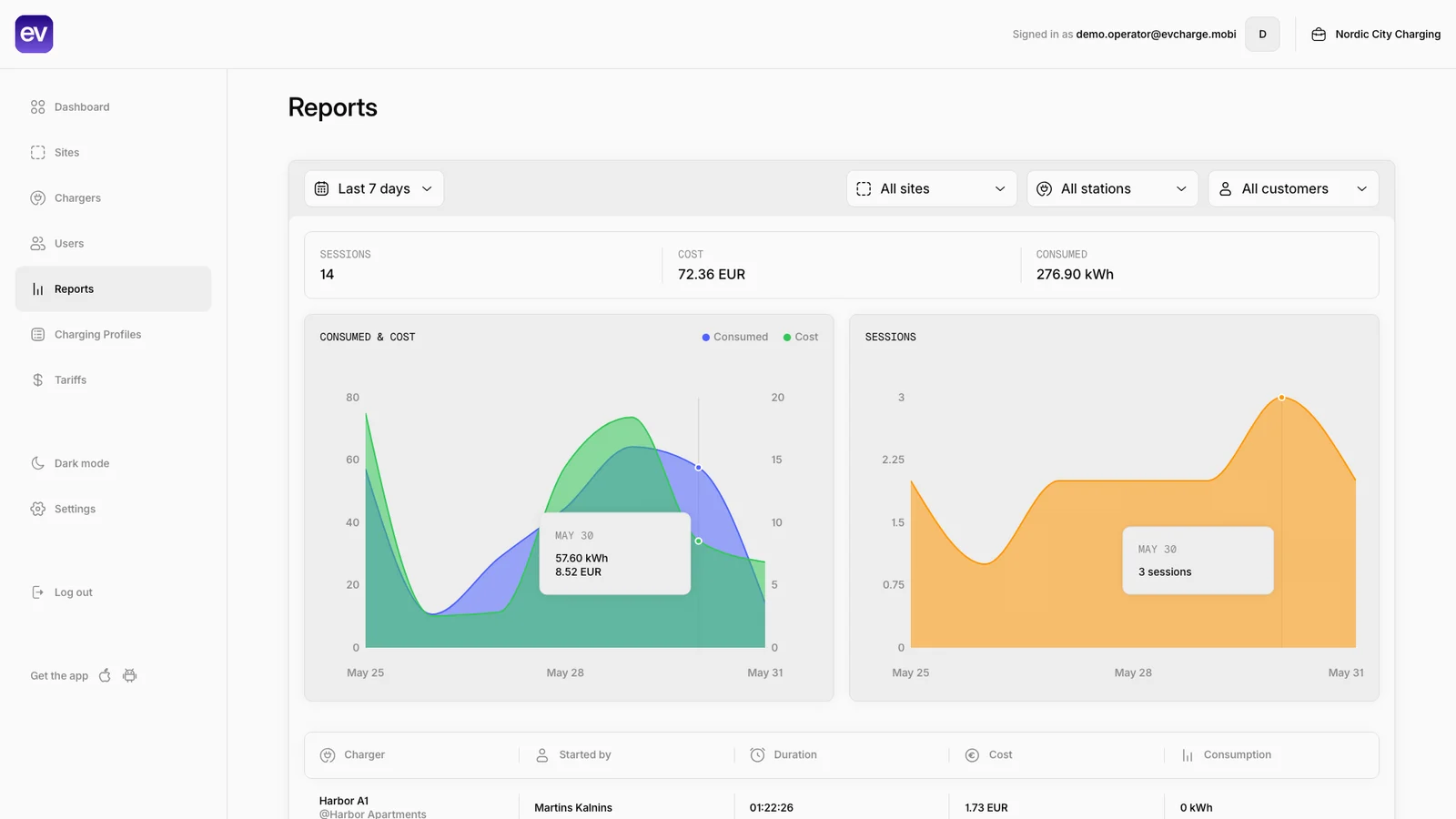
Demo screenshot from the product guide: start with the date range and session overview in Reports. The on-screen site, charger and driver filters do not narrow the current download. Open the image for a closer view.
How interval energy is calculated
The interval export uses consecutive cumulative energy-register readings from the charger. The difference between two usable readings gives the energy recorded between them.
If that reading interval crosses a reporting boundary, the energy is divided in proportion to elapsed time. For example, suppose an energy register rises by 2 kWh between 10:10 and 10:20 UTC. A 15-minute export assigns 1 kWh to the period ending at 10:15 and 1 kWh to the following period.

Illustrative readings: the 2 kWh difference is split equally because five minutes fall on each side of the 10:15 reporting boundary. This estimates allocation between readings. Select the diagram to open it at full size.
That division is an estimate. It does not prove the charger delivered the same power in each minute. More frequent usable readings give a clearer picture of what happened around interval boundaries.
The exporter accepts supported energy-register units and skips negative differences associated with a register reset. Missing or unusable readings limit what can be reconstructed.
Add recorded cost when you need it
The priced interval formats include the historical tariff components stored during session billing. They do not rebuild an old session's costs using today's tariff configuration.
That distinction matters when tariffs change. It also helps when comparing the energy delivered with the energy represented by recorded billing rows: the export keeps those quantities visible separately.
Check the currency and pricing status before using the result. A period with energy but no stored tariff cost is marked not_priced. An empty cost is not evidence that charging was free.
Check scope, time, and phases
The interval timestamps are in UTC. Convert them deliberately if you want to compare them with a local working day or another system's reporting periods. UTC interval rows are not automatically local-calendar buckets.
Phase-specific readings also require care. In an unpriced energy export, do not add an aggregate register to its individual phase registers; that can count the same energy twice. The priced export prefers an aggregate register when both forms are present.
The current download uses the selected workspace and date range. Site, charger, and driver filters in the on-screen table do not narrow the download. Filter the resulting file if you need a smaller subset.
Downloads are bounded: session selection is limited to 2,000 sessions, and meter and cost data have separate 100,000-record limits. Use shorter date ranges for larger datasets.
Make charging review a repeatable routine
Open Reports in the CPO Portal and begin with a known session. Compare its summary, raw readings and interval rows. Check the reporting frequency, units and gaps before interpreting a pattern such as whether workplace charging followed the intended schedule.
Use a manageable date range for a wider review, keeping export limits and workspace-wide download scope in mind. The interval export guide provides field definitions for bringing the data into another reporting process.
For routine oversight, Reports can also schedule a CSV or PDF of the previous calendar month's sessions to a chosen recipient, subject to plan access. That scheduled summary is separate from the detailed interval exports discussed here. Use the summary for recurring review and interval files for investigation.
If your chargers are not connected yet, follow the first-charger setup and collect a controlled first session. EVCharge brings charger management, session evidence and energy investigation into the same operator workspace.
Bring your chargers online today.
Create a free CPO Portal account and connect your first OCPP charger in minutes.