EV Charging Management Platform for Businesses and CPOs

Use the CPO Portal to manage charging stations, users, access, tariffs, sessions, reports, monitoring, smart profiles, and Dynamic Load Management.
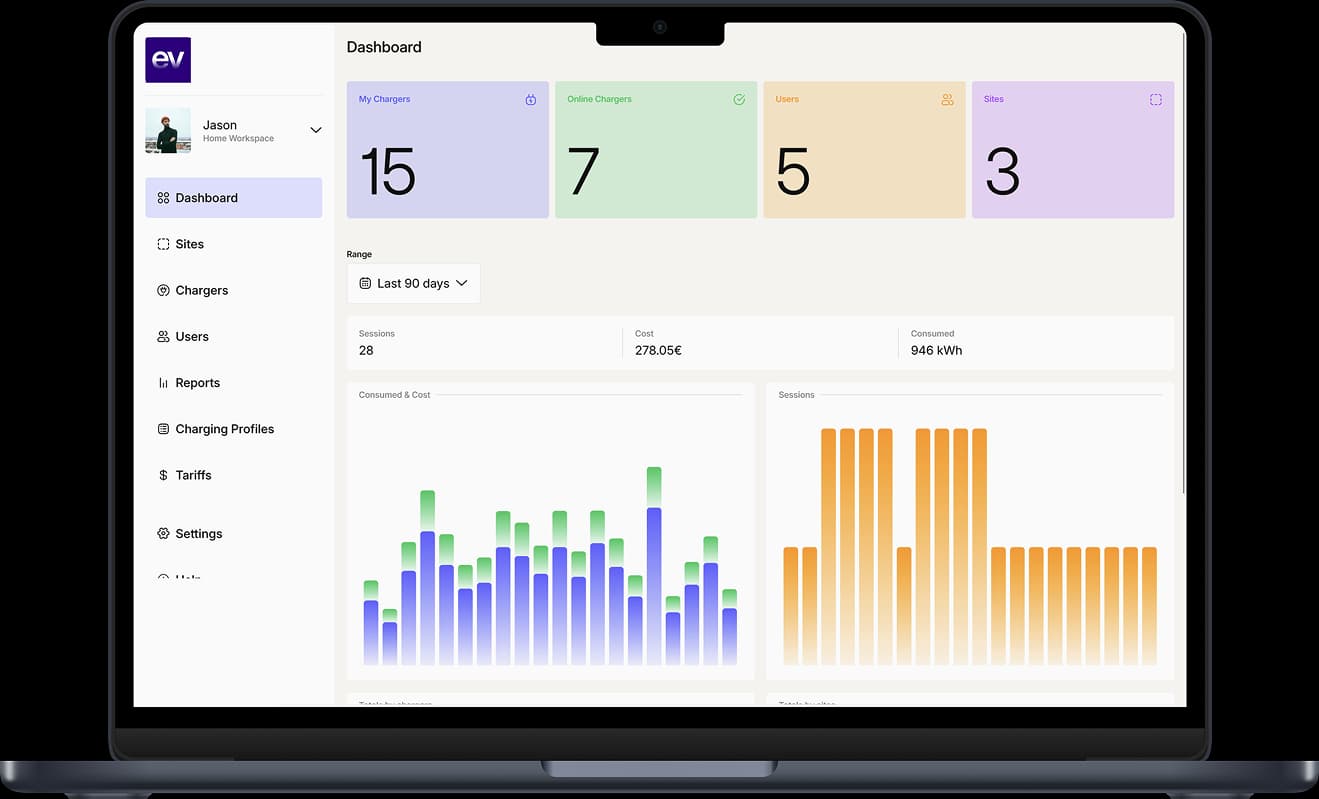
From CPO account to managed charging operations.

Operators use the CPO Portal to turn connected chargers into an operating setup with sites, users, tariffs, monitoring, reports, and capacity controls.

  1. Create the operator workspace

    Start from the CPO Portal and create the account structure for the organization, business location, or charging network.

  2. Add sites, stations, and chargers

    Organize locations, stations, chargers, and connectors so the physical charging infrastructure is understandable in the portal.

  3. Invite users and assign access

    Give residents, employees, guests, tenants, private users, or operating teams the charger access they need.

  4. Configure tariffs and review reports

    Apply tariff rules where needed, then review session history, consumption, costs, and operational reports.

  5. Add smart controls where supported

    Use Smart Charging, dynamic tariffs, smart profiles, and Dynamic Load Management where charger setup and site conditions support them.

CPO Portal workflows operators can inspect.

CPO Portal screens bring together site structure, charger monitoring, user access, tariffs, reports, charging profiles, and Dynamic Load Management in one operator workspace.
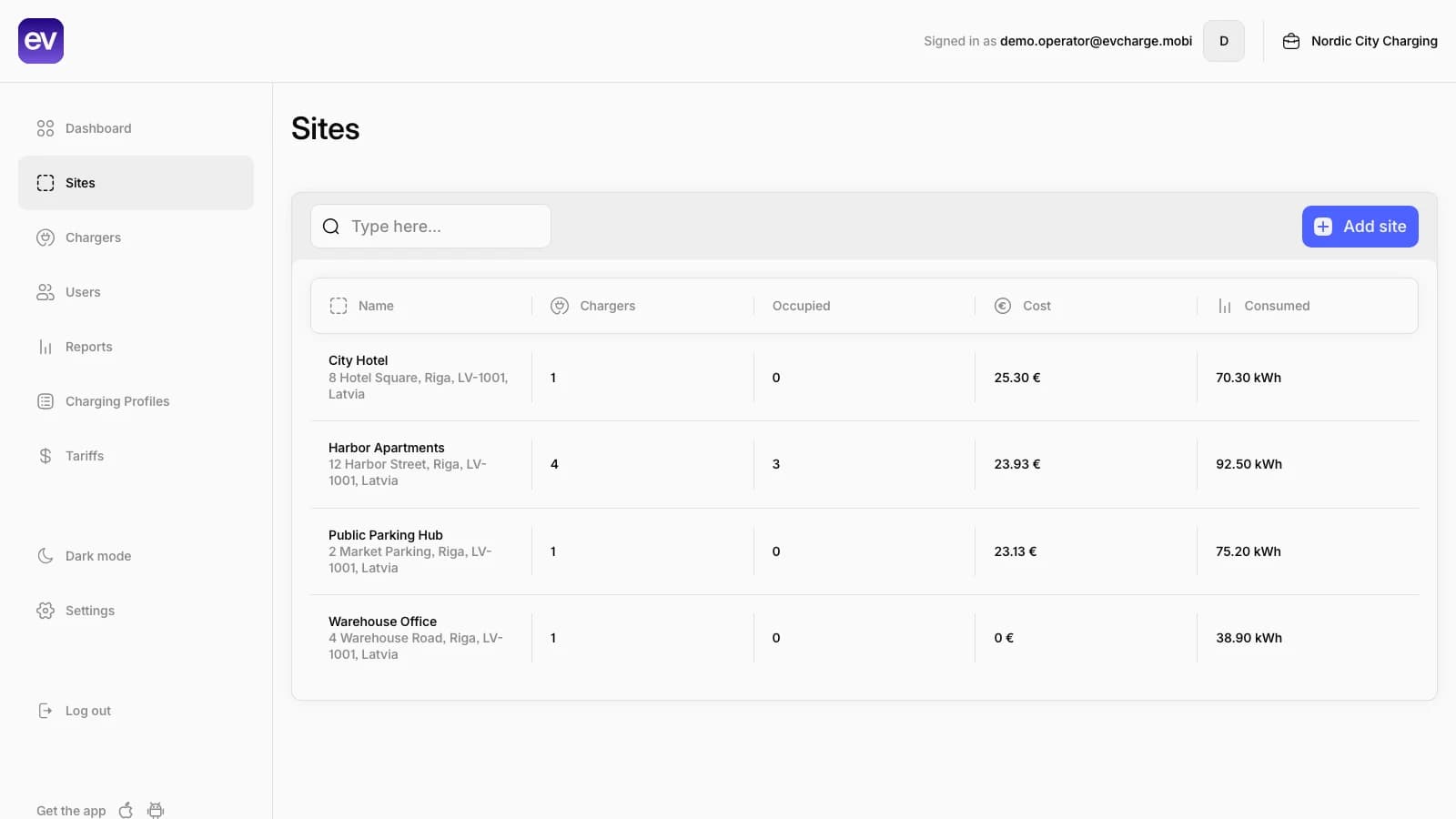
EVCharge.mobi Admin Portal showing a list of charging sites across different location types.
Sites and locationsReview apartment, hotel, workplace, and public charging locations from the operator workspace.Sites list

Charger fleet

Monitor connected chargers with practical status, site, connector, and usage context.

User grants and access

Assign residents, employees, guests, or drivers to the chargers they are allowed to use.

Tariff list

Keep resident, hotel, employee, private dynamic, and public dynamic tariffs in one operator view.

Reports and charts

Review filters, session totals, consumption, costs, and report charts for operator follow-up.

Charging profiles list

See Smart Charging, recurring workplace, and DLM ChargePointMaxProfile examples in one profile view.

Dynamic Load Management

Manage charger pools, shared site limits, and visible charger-level current limits.

What to prepare before adding chargers.

A smoother operator setup starts with charger compatibility, site ownership, access rules, tariff needs, and capacity constraints already understood.

  • Required

    Compatible charger setup

    Confirm OCPP support, backend URL access, charger identity, firmware behavior, and network reliability before onboarding.

    Learn more
  • Required

    Site and administrator ownership

    Decide who manages the workspace, locations, chargers, access changes, reports, and operational follow-up.

  • Recommended

    Access and pricing model

    Prepare whether chargers are private, shared, semi-public, or public-ready, and whether tariffs or cost allocation are needed.

    Learn more
  • Recommended

    Capacity and smart-control needs

    Review whether the site needs Smart Charging, dynamic tariffs, charging profiles, or Dynamic Load Management.

    Learn more

Explore the platform by use case and feature.

Find the page that matches your charging setup, from daily driver charging to multi-site charger operations.

Software Platform for EV Charger Installation Projects

Deliver compatible OCPP chargers with the software layer customers need for charger management, user access, tariffs, reports, Smart Charging, and Dynamic Load Management.

Learn more

EV Charging for Apartment Buildings

Manage resident EV charging fairly with user invitations, access control, consumption tracking, session exports, and shared infrastructure support.

Learn more

Hotel EV Charging Without Operational Complexity

Offer EV charging to guests with controlled access, pricing, public or private visibility, and simple management for reception or admin teams.

Learn more

Workplace EV Charging for Employees and Visitors

Manage employee charging, visitor access, tariffs or free charging, reports, smart charging, and Dynamic Load Management during the workday.

Learn more

Launch a Small EV Charging Network Without Building Software

Manage stations, connectors, tariffs, users, sessions, public charging readiness, smart profiles, and charger monitoring from one platform.

Learn more

OCPP Charger Management Platform

Connect compatible OCPP 1.6J chargers to EVCharge.mobi for station management, connector monitoring, access control, tariffs, sessions, and operator handover.

Learn more

Dynamic Load Management for EV Charging Sites

Coordinate EV charger demand around shared site capacity for apartments, workplaces, hotels, businesses, and small CPO networks where the installation supports it.

Learn more

EV Charging Session History and Reports

Review charging sessions, energy consumption, user activity, timing, costs, and export needs for charger owners and operators.

Learn more

Common questions.

Short answers for charger owners, drivers, installers, businesses, and small CPOs evaluating EVCharge.mobi.

Yes. EVCharge.mobi is intended to be self-serve: you can create an account and start with the available free plan. Contact the team if you need help with charger compatibility, site capacity, or a larger rollout.
The CPO Portal is the web workspace for charger owners and operators. It is used to manage locations, stations, connectors, users, access rules, tariffs, session history, reports, smart profiles, and Dynamic Load Management where supported.
Yes. Operators can use the CPO Portal to organize multiple charging locations, stations, and connectors, then manage access, tariffs, monitoring, and session records from one workspace.
Operators can configure tariffs for public paid charging and for reporting context across private, workplace, hotel, apartment, or semi-public scenarios. To make charging paid for drivers, the charger must be configured as Public. If the charger is not Public, granted users charge for free and tariffs are used for reports and cost visibility.
Operators can review charging session history and reports for charger usage, energy, timing, users, and tariffs where configured. Export depth can depend on the current portal configuration, so teams that need interval-level reporting can confirm that requirement before rollout.
Dynamic Load Management helps coordinate charging demand across one or more chargers so a site can work within available electrical capacity. Availability depends on the charger setup, site configuration, metering or capacity inputs, and supported OCPP control behavior.

Bring your chargers online today.

Create a free CPO Portal account and connect your first OCPP charger in minutes.