Run a paid charging session from tariff to receipt
A driver asks why the amount approved before charging is different from the amount on the final receipt. Your team should be able to explain the difference using the same session, rather than piecing together a tariff, a charger status and a payment message.
For an operator offering eligible public paid charging, EVCharge.mobi connects those steps: configure the connector’s tariff, check public-charging readiness, let the driver authorize a payment, then review the completed session. Start with one charger and make sure the person answering driver questions understands each stage.
Prepare the price and the public charger
In the CPO Portal, open Tariffs in the intended workspace. Review currency, tax and the pricing rules that apply during the charger’s operating hours. For market-linked pricing, check the bidding zone and fallback price too. The tariff guide explains the coverage and price-outlook views. Save the tariff and assign it to the intended connectors.
Next, open the charger’s Publicity tab. Resolve missing site coordinates, connector tariffs and payment requirements before making it public. Follow the payment setup offered for your account; accounts using Stripe Connect may also need to complete the provider’s requested information. A workspace’s EVCharge subscription and its public-charging payments are separate arrangements.
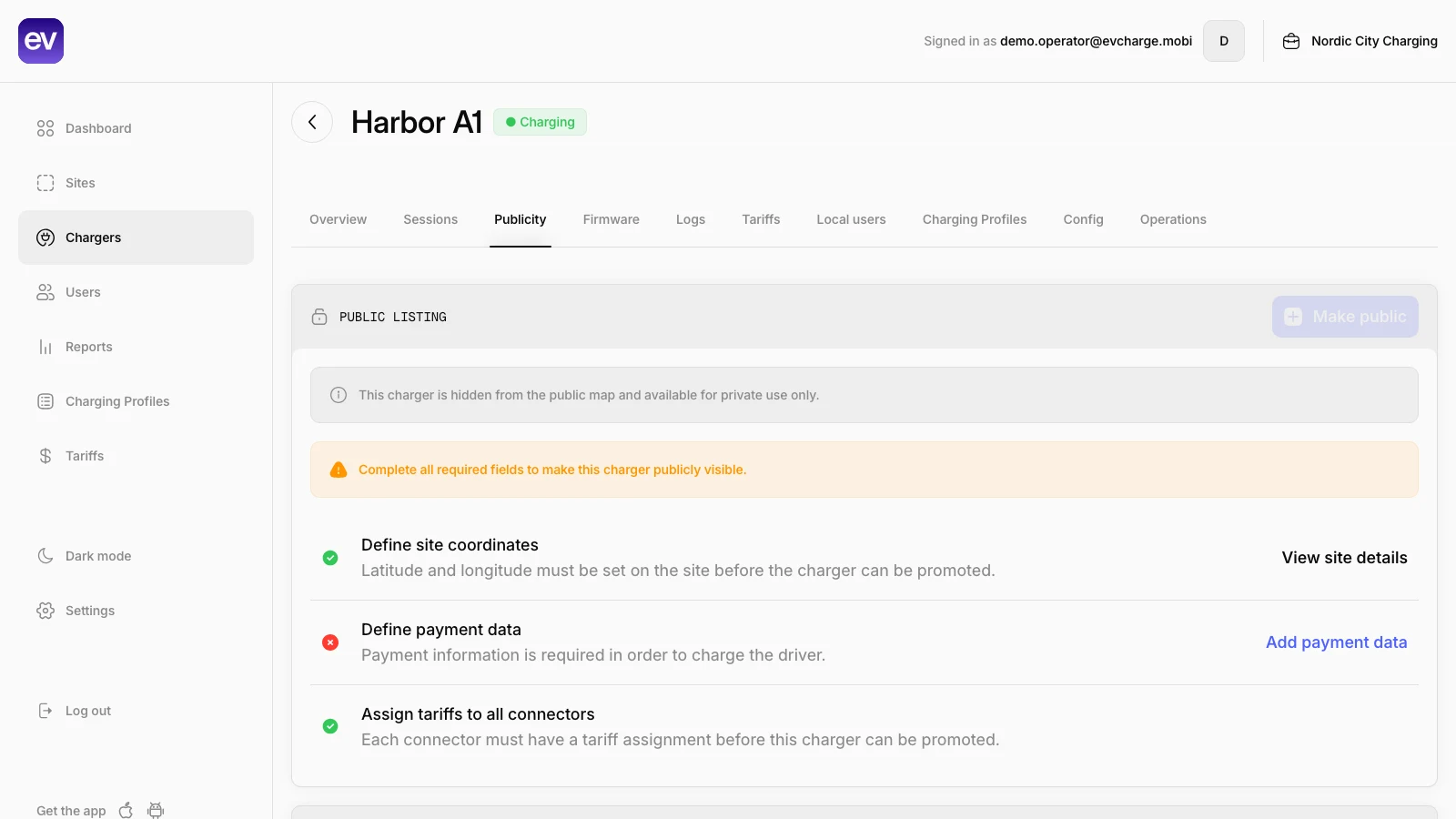
Public demo of the readiness checklist. In this example, payment setup is incomplete, so Make public is unavailable. Your account may also show plan and Stripe Connect requirements. Open the image at full size to inspect the controls; the charger and workspace are demo data.
Payment configuration alone does not enable every account to sell charging. Availability depends on the account’s public-charging access, applicable plan and enabled payment setup. Resolve the requirements shown for your workspace, using the payment guide where relevant. If access is unavailable, confirm eligibility before advertising paid charging at the site.
Explain what the driver authorizes
For a driver using the paid flow, the app presents the connector’s tariff and a choice of authorization amounts. The authorization is an amount held for the session; it is not the final recorded energy cost. Review any displayed minimum session charge and the operator’s terms before continuing to card authorization.
Where an approximate kWh figure is shown beside an amount, it uses the current tax-inclusive rate. It is a guide to that choice, not a promise of how much energy the vehicle will receive. Rates can change during a market-linked session, and a minimum charge can affect a short session’s final amount.
Public visibility and local access are independent. A driver already granted local access can receive ordinary charging controls instead of the public payment flow. That difference should be part of your staff’s explanation; a public listing does not mean every user follows the same checkout.
Wait for charging, then follow the session
After payment authorization, wait for the charger to confirm the start. An approved authorization and a charging session are different stages. Do not repeat payment while the first attempt is still processing.
During charging, inspect the recorded energy, current cost and charger status. Values depend on incoming meter data and can arrive with a delay. Treat the displayed spending information as a monitoring aid, not a guarantee of an exact instant at which the charger will stop. The start-and-stop guide gives the driver sequence to keep alongside your site instructions.
If a start fails or a payment result is unclear, refresh and check the current state before trying again. Keep the charger, connector, time and visible error for support. An unresolved payment should be investigated; an unavailable provider response is not proof that an authorization was cancelled.
Use the completed receipt to answer the question
After charging ends, open the session details. Finalizing your charging session… means the screen is not yet presenting a final amount charged. Return to it once processing completes instead of treating that message as a zero charge.
For a completed captured payment, check Energy delivered and Amount charged. When the minimum session charge applies, the receipt distinguishes the energy cost from the minimum and final charged amount. Where authorization details are available, Authorized and Released explain the difference between the original hold and the captured amount. The receipt does not establish when a bank will reflect the released portion in its available balance.
Use one completed session to establish your support routine: locate the right connector and time, compare the tariff and recorded energy, then distinguish the authorization from the final charge. Your team now has a concrete EVCharge workflow for answering the next driver’s payment question.
Bring your chargers online today.
Create a free CPO Portal account and connect your first OCPP charger in minutes.